HA-PEN01
Hearit.AI SmartPen
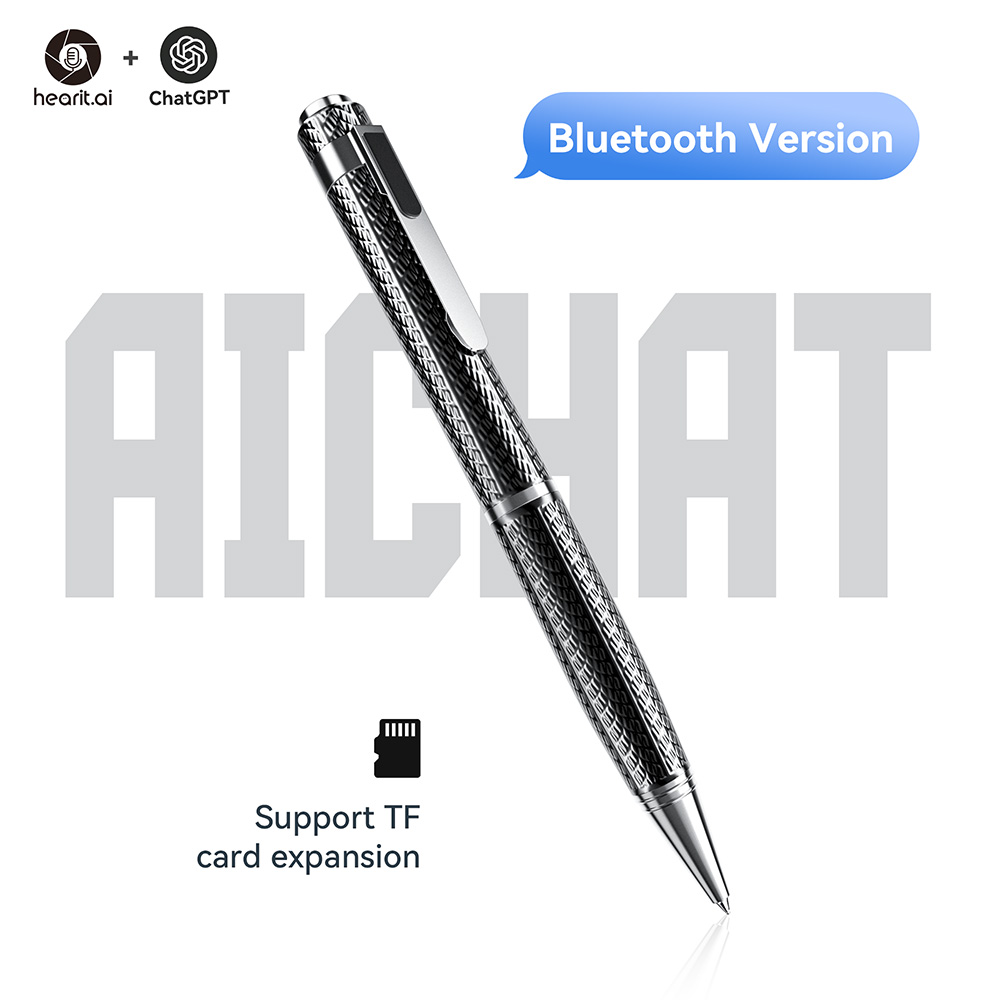
Table of Contents
- Introduction
- Specifications
- Quick Start Guide
- Hardware Guide
- Features in Detail
- Firmware
- Support
- Legal
1. Introduction
Your Dual-Purpose Voice & Writing Companion
The HA-PEN01 is an innovative AI voice recording pen that seamlessly combines professional audio recording capabilities with traditional writing functionality. Through advanced AI technology and dual recording modes, it helps you capture, organize, and analyze voice information in meetings, lectures, interviews, and daily communication. The HA-PEN01 serves as your efficient and reliable partner.
1.1. Core Features Overview
- ✨ AI Voice Interaction: Connect to cloud-based large language models for intelligent Q&A, content summarization, and transcription
- ✍️ Dual Functionality: Professional voice recording and smooth writing in one elegant device
- 📝 TF Card Local Recording: Offline recording with expandable storage - never miss important details
- 🔗 Multi-Platform Compatibility: Seamlessly connects to iOS and Android devices through the Hearit.AI App
- 🔋 Long Battery Life: Extended recording sessions for all-day demands
- 🎤 Professional Audio Quality: Clear voice capture with advanced noise reduction
- 💾 Multiple Recording Modes: APP-connected conversations and local TF card storage
- 🖊️ Retractable Pen Core: Traditional writing functionality with replaceable refills
2. Specifications
The HA-PEN01 is an advanced AI voice recording pen with dual functionality, combining professional audio recording with traditional writing in an elegant pen form factor.
📦 What's in the box?
- 1 × HA-PEN01 Recording Pen
- 1 × MicroUSB Charging Cable
- 1 × User Manual
- 1 × Pen Refill (pre-installed)
📄 Technical Specifications:
| Function | Parameter Details |
|---|---|
| Product Model | HA-PEN01 |
| Product Name | Hearit.ai SmartPen |
| Connection | Bluetooth V5.2 |
| Charging Interface | MicroUSB |
| Charging Specification | 5V / 200mA |
| Storage Support | TF Card (MicroSD) - FAT32 format |
| Recommended TF Card Size | 8GB to 32GB |
| Button Controls | Single multi-function button (on pen cap) |
| LED Indicator | Multi-color status indicator (behind pen clip) |
| Audio Quality | Professional-grade with noise reduction |
| Writing Function | Retractable pen core with standard refills |
| Battery Life | about 30 hours |
| App Support | Hearit.AI (iOS 11.0+ / Android 7.0+) |
3. Quick Start Guide
Get started with your HA-PEN01 in just a few simple steps.
Step 1: Unboxing & Charging
- Take the HA-PEN01 device and MicroUSB charging cable out of the package
- Before first use, we recommend fully charging the device using the included charging cable
- Charging (Device Off): Green LED solid
- Charging (Device On): Cyan/Teal LED (Blue + Green)
- Fully Charged: LED turns off
- Long-press the top button on the pen cap for 3 seconds to power on—you will see a blue LED solid light
Step 2: Choose Your Usage Mode
Select the recording method based on your usage requirements.
Mode A: Connect via App (For AI-Powered Recording)
This mode provides full access to AI features including transcription, translation, and intelligent analysis.
1. Download the App:
a. Download links:
Alternatively, search for "Hearit.AI" in Google Play Store or Apple App Store.
b. Open the App and complete registration or login as prompted
2. Bluetooth Pairing:
a. Enable Bluetooth on your phone
b. Power on the device by long-pressing the top button on the pen cap
- Confirmation: Blue LED becomes solid
c. In the Hearit.AI App home page, tap "Add Device" and select your device model (HA-PEN01) from the list
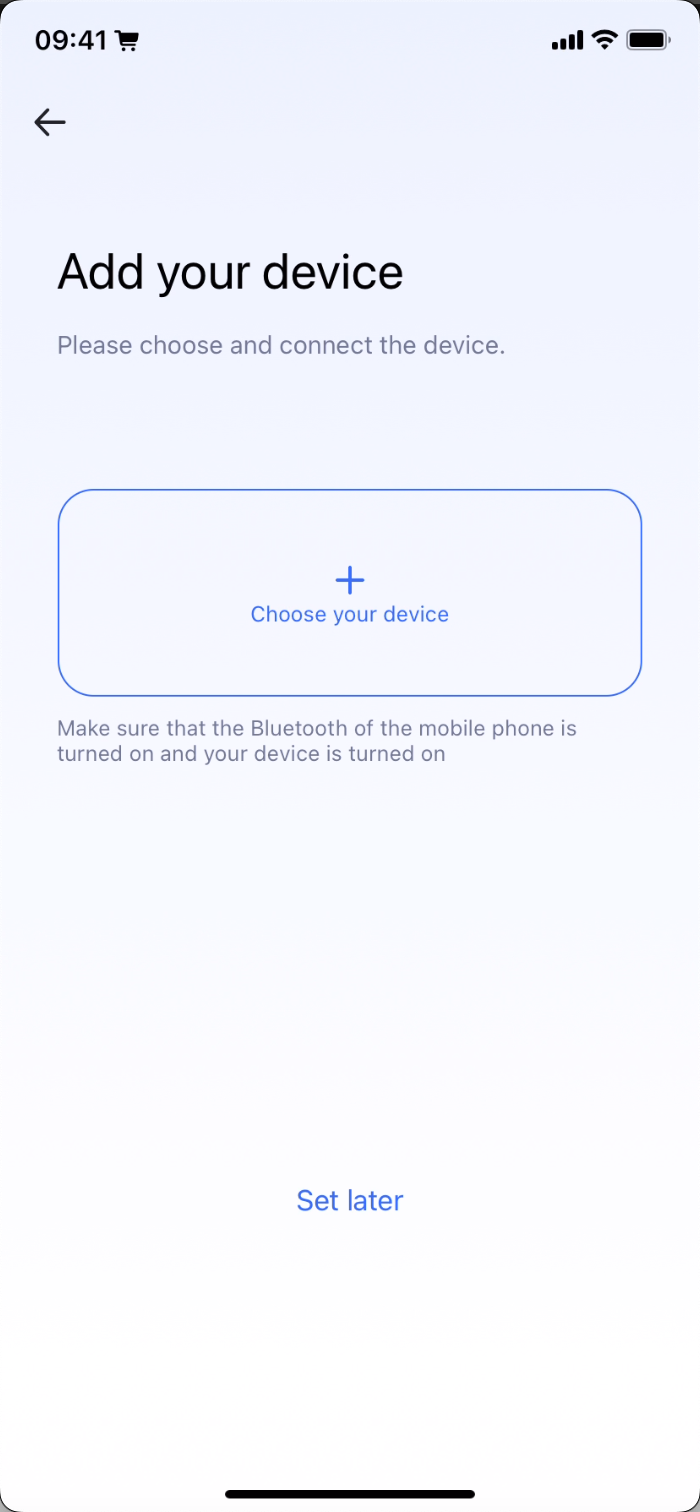
d. Follow the App prompts to complete the connection. Once connected successfully, the App will display "Connected"
e. Tap "Start Using" to enter the main interface
Mode B: TF Card Local Recording (For Offline Use)
This mode allows standalone recording without phone connection, storing audio files directly to a TF card.
1. Prepare TF Card:
a. Insert a formatted TF card (FAT32, 8GB-32GB recommended) into the TF card slot
b. Ensure sufficient storage space is available
2. Direct Use:
a. With device powered on, single press the top button to start recording
- Purple LED becomes solid during recording
- Red LED flashes twice if TF card is not inserted
b. Single press again to stop recording
c. Connect device to computer via USB to access recorded audio files
Step 3: Start Using
Congratulations! Your device is now set up. You can now begin exploring the powerful features of the HA-PEN01.
Using the Pen:
-
APP Recording: Double press top button to start/stop AI-powered recording
-
TF Card Recording: Single press top button to start/stop offline recording
-
Writing: Rotate pen tip counterclockwise to extend writing core
-
Mode Switching: Triple press top button to change AI modes (when connected to app)
视频加载中...
4. Hardware Guide
4.1. Button Operations
Top Button (Located on Pen Cap)
The HA-PEN01 features a single multi-function button on the pen cap that controls all device operations.
| Operation | Function | LED Feedback |
|---|---|---|
| Single Press | Start/Stop TF card recording | 🟣 Purple solid (recording) 🔴 Red flashes 2× (no TF card) |
| Double Press | Start/Stop APP conversation | 🟣 Purple solid (recording) 🔴 Red flashes 2× (BLE not connected) |
| Triple Press | Switch AI modes (APP connected) | 🔴 Red flashes 2× (BLE not connected) |
| Long Press (3s) | Power On/Off | 🔵 Blue solid (on) 🔴 Red flashes 3× (off) |
| Press 5× + Hold | Enter USB firmware update mode | LED turns off |
4.2. LED Indicator Status
The LED indicator is positioned behind the pen clip for easy status visibility.
System Status
| Status | LED Pattern | Meaning |
|---|---|---|
| Power On | 🔵 Blue solid | Device is powered on and ready |
| Power Off | 🔴 Red flashes 3× | Device shutting down |
| Charging (Off) | 🟢 Green solid | Device charging while powered off |
| Charging (On) | 🔵🟢 Cyan/Teal | Device charging while powered on |
| Fully Charged | LED off | Charging complete |
Recording Status
| Status | LED Pattern | Meaning |
|---|---|---|
| TF Recording Active | 🟣 Purple solid | Recording to TF card |
| APP Recording Active | 🟣 Purple solid | Recording via app |
| TF Card Error | 🔴 Red flashes 2× | TF card not inserted or error |
| BLE Not Connected | 🔴 Red flashes 2× | Bluetooth connection required |
4.3. Power & Charging
Interface: MicroUSB
Charging Status:
- Device Off + Charging: 🟢 Green solid
- Device On + Charging: 🔵🟢 Cyan/Teal (Blue + Green)
- Fully Charged: LED turns off
Power Management:
- Long press top button (3s) to power on/off
- Auto sleep after 3 minutes of inactivity (when not recording)
- Can charge while recording
Device Layout:
- Top Button: On pen cap for all controls
- LED Indicator: Behind pen clip for status
- Charging Port: MicroUSB interface
- TF Card Slot: For local storage expansion
- Writing Tip: Retractable pen core
5. Features in Detail
5.1. AI Voice Interaction
After connecting via the App, the HA-PEN01 provides powerful AI-powered voice interaction capabilities.
🤖 APP-Connected Recording
How to use:
- Ensure device is paired with Hearit.AI app (blue LED solid when powered on)
- Double press the top button to start conversation
- Purple LED becomes solid during recording
- If not connected: Red LED flashes twice
- Speak clearly with pen at comfortable distance
- Double press again to end conversation
- View transcript and AI-processed content in the app
Features:
- Real-time Transcription: Instant voice-to-text conversion
- AI Processing: Intelligent content analysis and summarization
- Cloud Storage: Automatic backup to your account
- Multi-language Support: 52+ languages with automatic detection
- Mode Selection: Switch between AI modes with triple press
🌍 AI Mode Switching
Triple press the top button when connected to APP to cycle through:
- Translation Mode: Real-time multilingual translation
- Meeting Mode: Professional meeting transcription and summaries
- Custom Mode: Personalized AI assistant behavior
- Note-taking Mode: Intelligent note organization
5.2. TF Card Local Recording
Record anytime without connecting to your phone - perfect for offline use.
💾 Offline Recording
Prerequisites:
- TF card properly inserted (FAT32 format, 8GB-32GB recommended)
- Sufficient storage space available
- Device powered on
How to use:
- Insert TF card into device slot
- Single press the top button to start recording
- Purple LED solid during recording
- Red LED flashes twice if TF card not inserted
- Speak normally near the device
- Single press again to stop recording
- Connect to computer via USB to access audio files
Features:
- No Internet Required: Complete offline functionality
- High-Quality Audio: Professional-grade recording with noise reduction
- Large Capacity: Support for various TF card sizes
- Easy File Access: Device appears as USB storage when connected to computer
- Standard Audio Format: Compatible with common media players
5.3. Writing Function
The HA-PEN01 features a retractable pen core for traditional writing functionality.
🖊️ Pen Core Operation
Extending the Pen Core:
- Grip the pen tip firmly
- Rotate counterclockwise to extend the writing core
- Continue rotating until desired length is reached
- Ready to write on paper or other surfaces
Retracting the Pen Core:
- Grip the pen tip firmly
- Rotate clockwise to retract the writing core
- Continue rotating until core is fully retracted
- Pen returns to compact recording mode
Writing Experience:
- Smooth Ink Flow: Professional-grade writing quality
- Comfortable Grip: Ergonomic design for extended use
- Dual Purpose: Seamlessly switch between recording and writing
- Replaceable Refills: Uses standard pen refill cartridges
6. Firmware
For detailed firmware update instructions and methods, please visit the dedicated firmware update page:
👉 View Firmware Update Guide for HA-PEN01
7. Support
7.1. FAQ (Frequently Asked Questions)
Q1: How do I know if the device is recording?
- A: The purple LED will be solid during active recording in both APP and TF card modes.
Q2: Can I use the pen for writing while recording?
- A: Yes! You can extend the pen core and write while the device is recording audio. The dual functionality allows simultaneous recording and writing.
Q3: What type of TF card is supported?
- A:
- Format: FAT32
- Recommended capacity: 8GB to 32GB for optimal performance
- Standard micro SD/TF cards
Q4: What should I do if the device won't connect to the app?
- A:
- Ensure Bluetooth is enabled on your phone
- Long press to turn device off, then long press to turn on
- Ensure device is within 10m of your phone
- Try removing the device from Bluetooth settings and re-pairing
Q5: How long can I record on a single charge?
- A: Recording time varies based on usage, but typically provides about 30 hours of continuous recording. Exact duration depends on LED usage and Bluetooth connection status.
Q6: What happens if I accidentally press the button during writing?
- A:
- Single press: Start/stop TF card recording (red flashes 2× if no card)
- Double press: Start/stop APP conversation (red flashes 2× if not connected)
- Triple press: Switch AI modes (red flashes 2× if not connected)
- Long press: Power off device (red flashes 3×)
Q7: How do I switch between different AI modes?
- A: When connected to the APP, triple press the top button. Available modes include Translation, Meeting, Custom, and Note-taking. If not connected, red LED will flash twice.
Q8: How do I access my TF card recordings?
- A: Connect the HA-PEN01 to your computer via USB cable. The device will appear as a USB storage device. Browse the files and copy them to your computer.
Q9: Can I replace the pen refill?
- A: Yes! Use compatible pen refills that match the device specifications. See the Maintenance & Care section for detailed replacement instructions.
Q10: What should I do if the LED doesn't light up?
- A:
- Check if battery needs charging (connect to USB)
- Ensure device is powered on (long press top button)
- If green LED doesn't show when charging, try different USB cable
- If issues persist, contact support
7.2. Maintenance & Care
Pen Refill Replacement
Tools Needed:
- Small flathead screwdriver
- New pen refill cartridge (compatible type)
Replacement Steps:
-
Open the Pen Body:
- Grip the pen barrel firmly
- Rotate the pen shell clockwise to unscrew
- Carefully separate the two halves
-
Remove Old Refill:
- Locate the pen refill screw mount
- Use screwdriver to rotate counterclockwise
- Gently pull out the old refill cartridge
-
Install New Refill:
- Insert new refill cartridge into position
- Use screwdriver to rotate clockwise to secure
- Ensure refill is firmly seated
-
Reassemble Device:
- Align the pen halves carefully
- Rotate counterclockwise to close the shell
- Test writing function to ensure proper installation
General Care
- Keep Dry: Avoid exposure to moisture and water
- Clean Regularly: Wipe with soft, dry cloth
- Charge Properly: Use provided MicroUSB cable
- Store Safely: Keep in protective case when not in use
- Avoid Drops: Handle with care to prevent damage
- TF Card: Remove if not used for extended periods
Storage Recommendations
- Temperature: Store at room temperature (15-25°C)
- Humidity: Keep in dry environment
- Position: Store horizontally to prevent ink leakage
- Charging: Charge device every 3 months if not in use
7.3. Contact Us
If you encounter any issues that cannot be resolved, or if you have any suggestions, please feel free to contact us through the following channels:
- Official Support Email: support@hearit.ai
- Online Help Center: https://support.hearit.ai
- Technical Documentation: https://docs.hearit.ai
- Support Center: https://hearit.ai/support
8. Legal
8.1. Disclaimer
AI Service Responsibility:
This product's AI functions are powered by third-party large language models. Our company does not assume any responsibility for the accuracy, completeness, or compliance of content generated by these AI services.
Recording Legality:
When using the recording function, users must strictly comply with local laws and regulations regarding audio recording. Users are solely responsible for any legal disputes arising from illegal recording activities.
Firmware Update Risks:
During firmware updates, any device damage or data loss caused by improper operation (such as power interruption during update, use of unofficial firmware, physical device damage, etc.) or failure to follow official guidelines is not covered under warranty.
Data Storage:
Users are responsible for backing up important recordings stored on TF cards. We recommend regularly transferring files to a computer or cloud storage. Data loss due to TF card failure or damage is not covered under warranty.
8.2. Warranty Policy
This product is provided with a limited warranty for a period of one (1) year from the date of purchase. This warranty does not cover damage caused by accidents, misuse, abuse, or unauthorized modifications. For detailed warranty terms, please visit our official warranty page.
Warranty Exclusions:
- Normal wear and tear of pen refills
- Damage from improper pen refill replacement
- TF card failures or compatibility issues
- Damage from exposure to liquids or extreme conditions
Thank you for choosing HA-PEN01!
We are committed to continuously improving our products and services. Your feedback helps us make the HA-PEN01 even better.
For the latest updates, tips, and tutorials, visit:
- Website: https://hearit.ai
- Documentation: https://docs.hearit.ai
- Community Forum: https://community.hearit.ai