HA-SPK03 BT
Hearit.AI SpeakAI
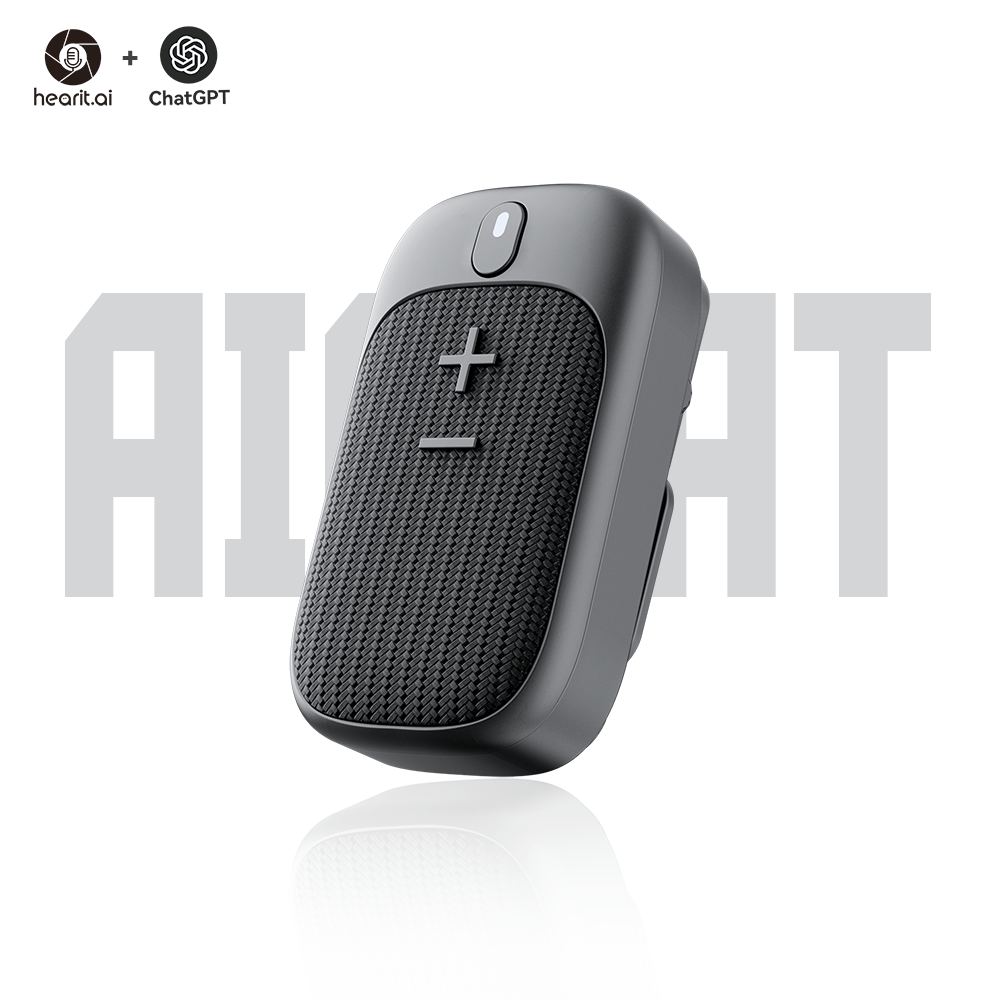
Table of Contents
- Introduction
- Specifications
- Quick Start Guide
- Hardware Guide
- Features in Detail
- Firmware
- Support
- Legal
1. Introduction
Your Professional AI Voice Companion
The HA-SPK03 BT is a professional-grade portable AI-powered speaker designed for seamless voice interaction and recording. With advanced dual Bluetooth connectivity, IPX5 waterproof protection, and powerful 3W audio output, it helps you capture and interact with AI in meetings, outdoor activities, and daily communication. The HA-SPK03 BT serves as your efficient and reliable professional partner.
1.1. Core Features Overview
- ✨ AI Voice Interaction: Connect to cloud-based large language models for intelligent Q&A
- 🔊 Powerful Audio: 3W maximum speaker power for clear sound output
- 💧 IPX5 Waterproof: Professional-grade water resistance for outdoor use
- 🔗 Dual Bluetooth: Supports both Classic Bluetooth and BLE connectivity
- 🧲 Versatile Mounting: Includes magnetic suction mount and back clip
- 🔋 Extended Battery: 5-8 hours working time with 1000 hours standby
- 📱 App Integration: Seamlessly works with the Hearit.AI App
- 🎤 Professional Recording: High-quality audio capture with real-time transmission
- 💪 Durable Build: ABS + PC + Aluminum alloy construction
2. Specifications
The HA-SPK03 BT is a professional-grade AI-powered portable speaker with dual Bluetooth connectivity, designed for voice interaction and recording.
📦 What's in the box?
- 1 × HA-SPK03 BT Device
- 1 × USB Type-C Charging Cable
- 1 × Magnetic Suction Mount
- 1 × Back Clip Mount
- 1 × User Manual
📄 Technical Specifications:
| Function | Parameter Details |
|---|---|
| Product Model | HA-SPK03 BT |
| Product Name | Portable ChatGPT AI chat Speaker |
| Bluetooth Version | V5.3 (Classic + BLE) |
| Transmission Frequency | 2.4-2.48 GHz |
| Transmission Distance | 10 m |
| Speaker Power | 3W maximum |
| Charging Interface | USB Type-C |
| Charging Voltage | 5V |
| Charging Time | 1 hour |
| Working Time | 5-8 hours |
| Standby Time | ~1000 hours |
| Battery Capacity | 3.7V, 600mAh |
| Waterproof Rating | IPX5 |
| Material | ABS + PC + Aluminum alloy |
| Mounting Methods | Magnetic suction + Back clip |
| Net Weight | 64g |
| Dimensions | 73 × 42.9 × 28.2 mm |
| Giftbox Size | 77 × 35 × 87 mm |
| Packing Weight | 105g |
| App Support | Hearit.AI (iOS 11.0+ / Android 7.0+) |
3. Quick Start Guide
Get started with your HA-SPK03 BT in just a few simple steps.
Step 1: Unboxing & Charging
- Take the HA-SPK03 BT device and accessories out of the package
- Before first use, we recommend fully charging the device using the included charging cable
- Charging: Status LED steady green
- Fully Charged: LED turns off
- Long press the main button until you hear a startup sound and the device powers on
Step 2: Connect via App
This mode is suitable for the HA-SPK03 BT, which works with the mobile app for full access to AI features.
1. Download the App:
a. Download links:
Alternatively, search for "Hearit.AI" in Google Play Store or Apple App Store.
b. Open the App and complete registration or login as prompted
2. Bluetooth Pairing:
a. Long press the main button to power on the device
b. The device automatically broadcasts both Classic Bluetooth and BLE signals
c. On your smartphone, enable Bluetooth
d. In the Hearit.AI App home page, tap "Add Device" and select your device model (HA-SPK03) from the list
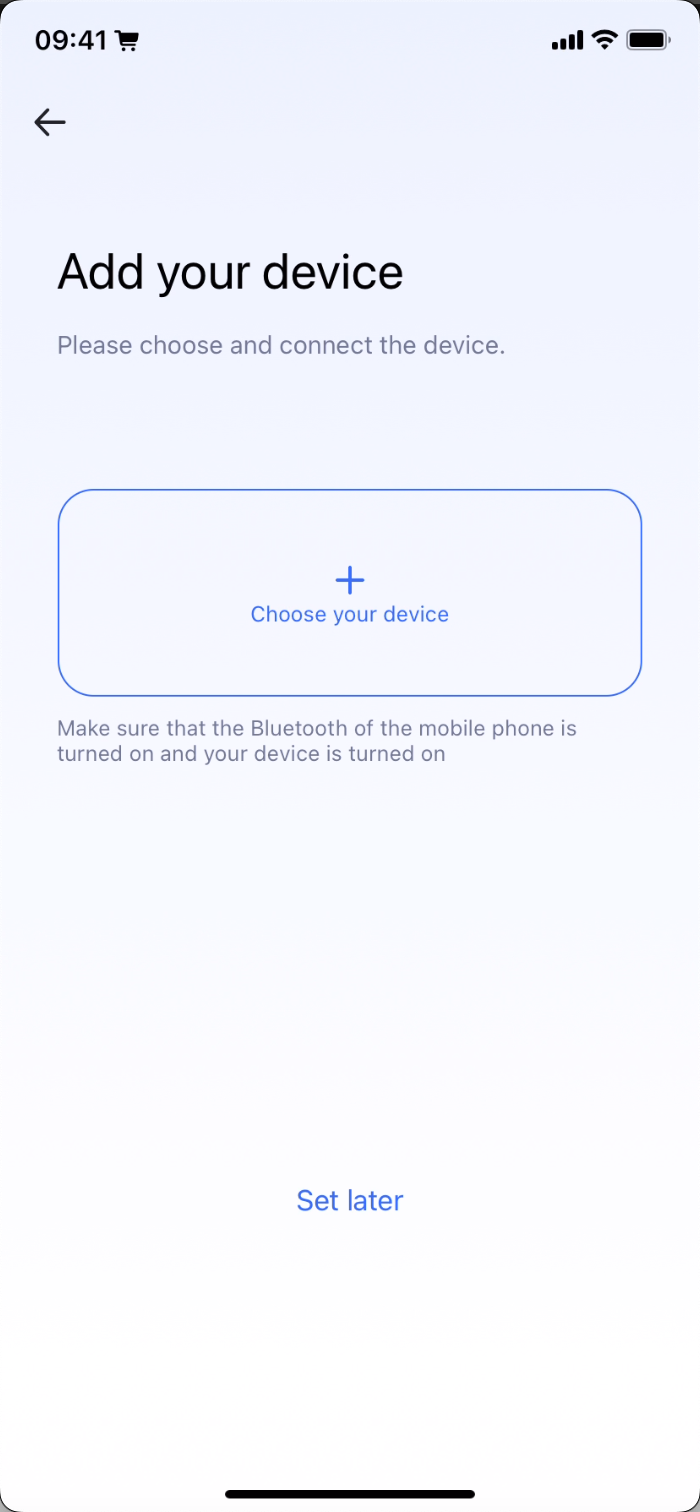
e. Follow the App prompts to complete the connection
f. Once connected successfully:
- You'll hear "Connected" voice prompt
- Status LED flashes green twice
- The App displays "Connected"
g. Tap "Start Using" to enter the main interface
Step 3: Start Using
Congratulations! Your device is now set up. You can now begin exploring the powerful features of the HA-SPK03 BT.
Using the Speaker:
- AI Recording: Single press the main button to start/stop recording
- Mode Switching: Double press the main button to switch AI modes
- Stop TTS Playback: Long press the main button
- Power Off: Triple press the main button
4. Hardware Guide
4.1. Button Operations
Main Button (Multi-Function Control)
| Operation | Function | LED Feedback | Audio/Vibration |
|---|---|---|---|
| Long Press | Power On | Status LED blinks | Startup sound |
| Triple Press | Power Off | — | Shutdown sound |
| Single Press | Start/Stop recording | 🔵 Blue steady during recording | — |
| Double Press | Switch AI modes (determined by App) | 🔵 Blue steady during recording | App announces current mode |
| Long Press (during use) | Announce current mode / Stop TTS playback | 🟢 Green on when pressed, off when released | Mode announcement |
4.2. LED Indicator Status
Connection Status
| Status | LED Pattern | Meaning |
|---|---|---|
| Recording Active | 🔵 Status LED: Steady blue | Recording in progress |
| Bluetooth Connected | 🟢 Status LED: Flashes green twice | Successfully paired |
| Bluetooth Disconnected | 🔴 Status LED: Red flashes (3×) every 0.5s | BLE connection lost |
| Reconnecting | 🔵 Status LED: Blue flashes (3×) every 0.5s | Attempting to reconnect |
Power Status
| Status | LED Pattern | Meaning |
|---|---|---|
| Low Battery | 🔴 Status LED: Red flashes (2×) every 0.8s | Battery ≤10% |
| Charging | 🟢 Status LED: Steady green | Charging in progress |
| Fully Charged | LED off | Charging complete |
4.3. Power & Charging
Interface: USB Type-C
Charging Status:
- Charging: 🟢 Status LED steady green
- Fully Charged: LED turns off
Power Management:
- Power On: Long press main button
- Power Off: Triple press main button
- Battery life: 5-8 hours of continuous use
- Standby time: ~1000 hours
5. Features in Detail
5.1. AI Voice Interaction
After connecting via the App, the HA-SPK03 BT provides professional AI-powered voice interaction capabilities.
🤖 AI Recording & Interaction
How to use:
- Ensure device is connected to the Hearit.AI app
- Single press the main button to start recording
- Speak your question, conversation, or notes
- Single press the main button again to stop recording
- The AI will process and respond through the speaker
Mode Switching:
- Double press the main button to cycle through modes
- The app determines available modes
- You'll hear an audio announcement of the current mode
Stop TTS Playback:
- Long press the main button to stop AI text-to-speech playback
- Useful when you need to interrupt a long AI response
Features:
- Professional Recording: High-quality audio capture with real-time transmission
- Intelligent Q&A: Ask the AI any questions
- Multi-language Support: Automatic language detection
- Real-time Processing: Instant AI response through powerful 3W speaker
- Mode Customization: Configure different AI modes through the app
5.2. Dual Bluetooth Connectivity
The HA-SPK03 BT supports both Classic Bluetooth and Bluetooth Low Energy (BLE) simultaneously.
📡 Dual Bluetooth Benefits
Classic Bluetooth:
- Used for high-quality audio transmission
- Connects to audio playback devices
- Supports music streaming
BLE (Bluetooth Low Energy):
- Used for app communication and control
- Low power consumption
- Fast connection and reconnection
Simultaneous Operation:
- Connect to the Hearit.AI app via BLE for AI features
- Connect to audio devices via Classic Bluetooth for playback
- Both connections work together seamlessly
Automatic Reconnection:
- Device remembers previous connections
- Automatically reconnects when Bluetooth is re-enabled
- Status LED flashes blue (3×) during reconnection
6. Firmware
For detailed firmware update instructions and methods, please visit the dedicated firmware update page:
👉 View Firmware Update Guide for HA-SPK03 (Bluetooth)
7. Support
7.1. FAQ (Frequently Asked Questions)
Q1: How do I switch between AI modes?
- A: Double press the main button to cycle through different AI modes. The mode switching is determined by the App, and you'll hear an audio announcement of the current mode.
Q2: How do I stop AI playback mid-response?
- A: Long press the main button to stop App TTS (text-to-speech) playback immediately.
Q3: What happens when the battery is low?
- A: When battery drops to ≤10%, the device provides voice alerts ("Battery Low") and LED flashes (red, 2×) every minute until you charge the device.
Q4: How do I power off the device?
- A: Triple press the main button to power off. You'll hear a shutdown sound.
Q5: The device won't connect to the app. What should I do?
- A:
- Ensure both Classic Bluetooth and BLE are enabled on your phone
- Make sure the device is powered on (long press main button)
- Try powering off and on the device (triple press, then long press)
- Remove the device from your phone's Bluetooth list and re-pair through the app
Q6: How long does it take to charge the device?
- A: Approximately 1 hour for a full charge from empty.
Q7: How long does the battery last?
- A: The battery provides 5-8 hours of continuous working time, depending on usage. Standby time is approximately 1000 hours (over 40 days).
Q8: What is the difference between Classic Bluetooth and BLE?
- A: The device uses both simultaneously:
- Classic Bluetooth: For high-quality audio streaming and music playback
- BLE (Bluetooth Low Energy): For app communication and control with lower power consumption
Q9: Why does the LED flash red after I disconnect?
- A: This is normal behavior. When the app actively disconnects BLE, the status LED flashes red (3×) to indicate the connection has been broken.
7.2. Experimental Features
Some advanced features are available in the Web-demo version of the app:
- Web-demo is compatible with Windows, macOS, and Android (iOS not supported)
- Access experimental features at: webdemo.hearit.ai
- These features may include advanced AI configurations and beta functionality
7.3. Contact Us
If you encounter any issues that cannot be resolved, or if you have any suggestions, please feel free to contact us through the following channels:
- Official Support Email: support@hearit.ai
- Online Help Center: https://support.hearit.ai
- Technical Documentation: https://docs.hearit.ai
8. Legal
8.1. Disclaimer
AI Service Responsibility:
This product's AI functions are powered by third-party large language models. Our company does not assume any responsibility for the accuracy, completeness, or compliance of content generated by these AI services.
Recording Legality:
When using the recording function, users must strictly comply with local laws and regulations regarding audio recording. Users are solely responsible for any legal disputes arising from illegal recording activities.
Firmware Update Risks:
During firmware updates, any device damage or data loss caused by improper operation (such as power interruption during update, use of unofficial firmware, physical device damage, etc.) or failure to follow official guidelines is not covered under warranty.
Waterproof Limitations:
The IPX5 rating provides protection against water jets and splashes but does not make the device fully waterproof or submersible. Damage caused by submersion in water or improper use in wet conditions is not covered under warranty.
8.2. Warranty Policy
This product is provided with a limited warranty for a period of one (1) year from the date of purchase. This warranty does not cover damage caused by accidents, misuse, abuse, unauthorized modifications, or water damage beyond the IPX5 rating specifications. For detailed warranty terms, please visit our official warranty page.
Thank you for choosing HA-SPK03 BT!
We are committed to continuously improving our products and services. Your feedback helps us make the HA-SPK03 BT even better.
For the latest updates, tips, and tutorials, visit:
- Website: https://hearit.ai
- Documentation: https://docs.hearit.ai
- Community Forum: https://community.hearit.ai